Policies
Policies Tab
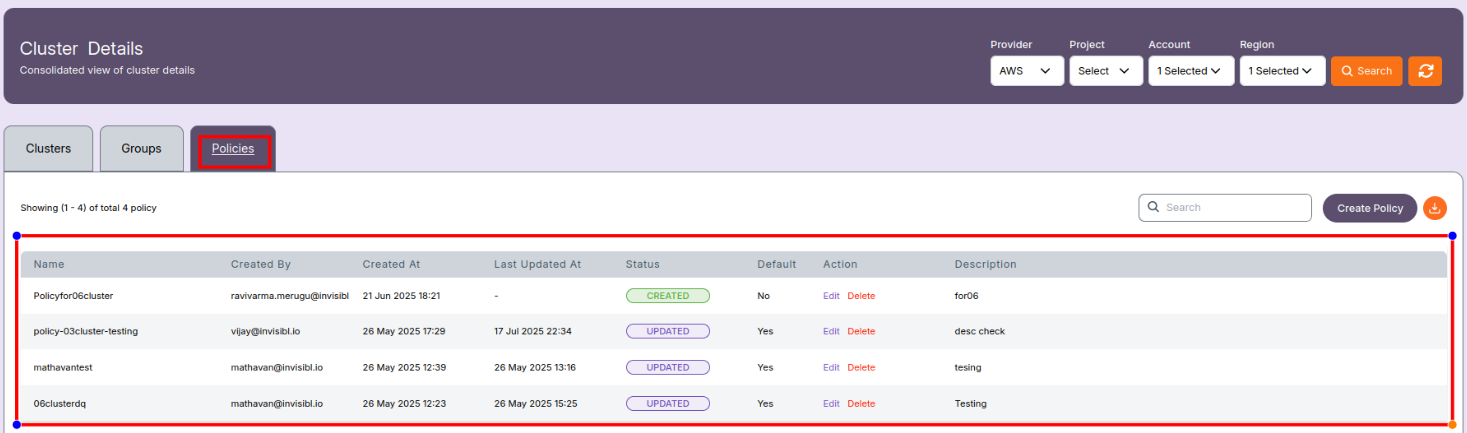
The Policies tab displays the list of defined QoS (Quality of Service) policies used to manage job priority, resource usage limits, and scheduling behavior in Slurm clusters.
These policies are crucial in controlling access to compute resources, setting job limits, and managing fair usage across multiple users or groups.
Filters
Use the top filter bar to narrow down policies:
- Provider: Cloud provider (e.g., AWS)
- Project: (Optional) Project associated with the policy
- Account: Cloud account ID
- Region: Deployment region for the policy
- Search: Click to apply selected filters
- Refresh: Reload the current list of policies

Policy Table Columns
| Column | Description |
|---|---|
| Name | Name of the policy (e.g., Policyfor06cluster) |
| Created By | Email ID of the user who created the policy |
| Created At | Date and time when the policy was created |
| Last Updated At | Timestamp of the latest modification |
| Status | Current state of the policy — CREATED or UPDATED |
| Default | Indicates if this is the default policy for the system (Yes / No) |
| Action | Options to Edit or Delete the policy |
| Description | Brief text explaining the purpose of the policy |
Functional Use of QoS Policies
QoS policies in Slurm define:
- Job priority boost
- Max walltime or run time for jobs
- CPU/memory limits
- Preemption rules (whether jobs can preempt others)
- Job size restrictions (nodes, CPUs per job)
- Fair-share weight adjustment
📝 Note:
- These policies map to Slurm QoS definitions configured through
sacctmgr. - Only one policy can be set as default at a time.
- Users or groups can be assigned to specific policies to control their job behavior.
- Users cannot edit or modify policies and groups. These are view-only. To request changes, please contact the system administrator.
📌 General Notes:
- If you encounter any UI issues or have questions about job submissions or status, please contact the Admin for support.