Cluster › Events
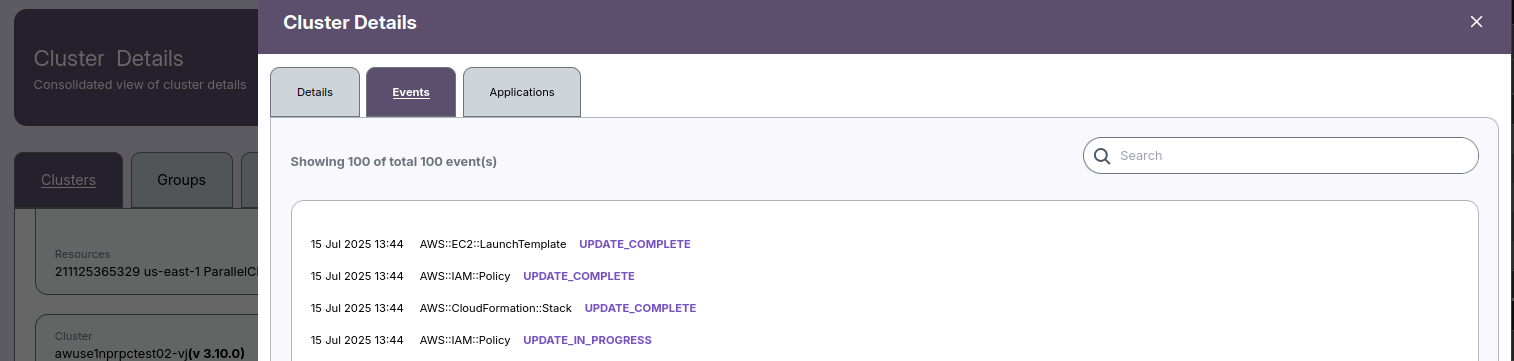
The Events tab in Cluster Details shows a time‑ordered audit of changes that affected the cluster and its underlying cloud resources (e.g., AWS::EC2::LaunchTemplate, AWS::IAM::Policy, AWS::CloudFormation::Stack). Use it to verify deployments, track updates, and troubleshoot failures.
When to use this tab
- Confirm a deployment or configuration change finished successfully.
- See what changed most recently and by which resource.
- Diagnose provisioning or update failures by reviewing error statuses/messages.
Page layout
A. Tabs
- Details – static configuration and metadata.
- Events (this page) – chronological change log.
- Applications – workloads associated to the cluster.
B. Toolbar
- Search: Filters the event list by free‑text (resource type/name, status, message).
- Count: Displays “Showing N of total M event(s)” for quick scope.
C. Event list
Each row is a single event:
| Column | Description | Examples |
|---|---|---|
| Timestamp | When the platform recorded the event. | 15 Jul 2025 13:44 |
| Resource | Provider resource or logical entity that emitted the event. | AWS::EC2::LaunchTemplate, AWS::IAM::Policy, AWS::CloudFormation::Stack |
| Status | Lifecycle state for that resource at the time of the event. | UPDATE_COMPLETE, UPDATE_IN_PROGRESS, CREATE_FAILED |
| Message (if present) | Extra context from the provider (error text, IDs, links). | Validation error details |
-
📌 General Notes
- Timestamps display in your browser’s local time zone.
Common statuses
| Status | Meaning | Typical next step |
|---|---|---|
CREATE_IN_PROGRESS |
Provisioning has started. | Monitor until complete. |
CREATE_COMPLETE |
Provisioning finished successfully. | None. |
UPDATE_IN_PROGRESS |
A change is being applied. | Wait; verify downstream resources. |
UPDATE_COMPLETE |
Update finished successfully. | Confirm workloads are healthy. |
DELETE_IN_PROGRESS |
Resource is being removed. | Wait; ensure dependencies are gone. |
DELETE_COMPLETE |
Resource removed. | None. |
*_FAILED / ROLLBACK_* |
Operation failed or rolled back. | Open the row, read the message, fix inputs/quotas/permissions, retry. |
Filtering & search
- Use the Search box to narrow events by resource, status, or any message text.
Examples: LaunchTemplateUPDATE_COMPLETEPolicy arn:aws:iam::...- Clear the search to return to the full list.
Typical event sources
Most clusters emit events originating from your cloud provider via orchestration layers (e.g., CloudFormation). Expect to see resources like:
AWS::EC2::LaunchTemplate– node/instance template updatesAWS::IAM::Policy/AWS::IAM::Role– permission changesAWS::AutoScaling::AutoScalingGroup– node pool scalingAWS::CloudFormation::Stack– stack‑level progress/rollbacks
Troubleshooting guide
- Scan from the newest event downward. The first
*_FAILEDorROLLBACK_*usually pinpoints the cause. - Open the event details (if expandable) and copy the error message.
- Common causes
- IAM/permission denied – missing
iam:CreatePolicy,ec2:CreateLaunchTemplate, etc. - Quota/limits – instance, ENI, or IP address limits reached.
- Invalid parameters – wrong AMI/Launch Template, malformed JSON/YAML.
- Retry safely
- Fix the underlying issue (permissions, quotas, parameters).
- Re‑run the update/deploy and watch
UPDATE_IN_PROGRESS → UPDATE_COMPLETE. - Cross‑check with CLI (optional)
```bash # CloudFormation stack events (example) aws cloudformation describe-stack-events --stack-name
- If you encounter any UI issues or have questions about job submissions or status, please contact the Admin for support.