Cluster › Applications
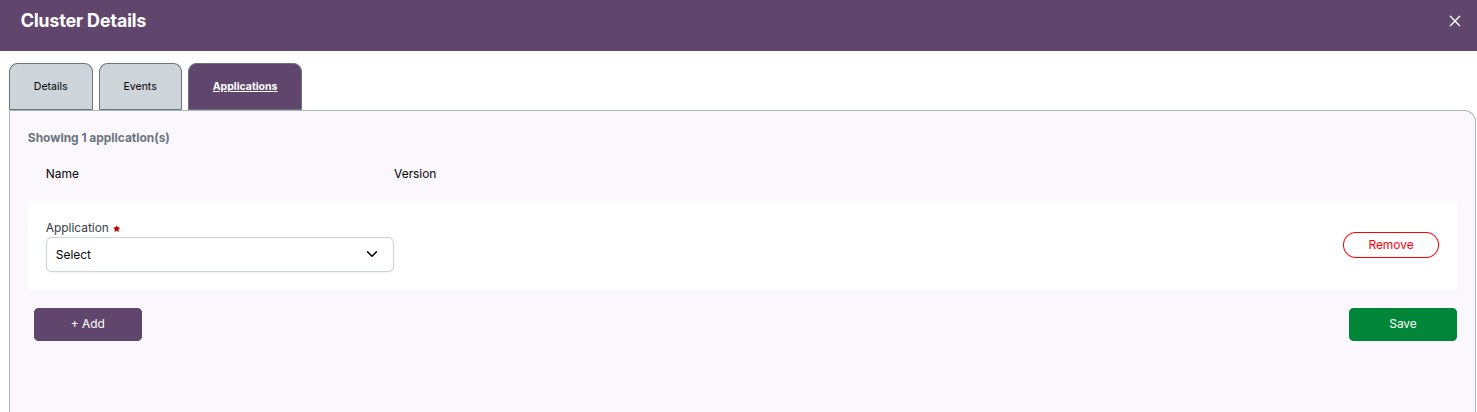
The Applications tab in Cluster Details allows you to associate specific software applications and their versions with a cluster. This is especially useful in HPC (High Performance Computing) environments or environments where software stack consistency is required.
Use cases
- Track what software is installed on a cluster.
- Ensure consistent application versions across compute clusters.
- Enable user visibility into available tools (e.g., ANSYS, MATLAB, Fluent).
- Validate software compatibility during workload scheduling.
Interface overview
Components
| Section | Description |
|---|---|
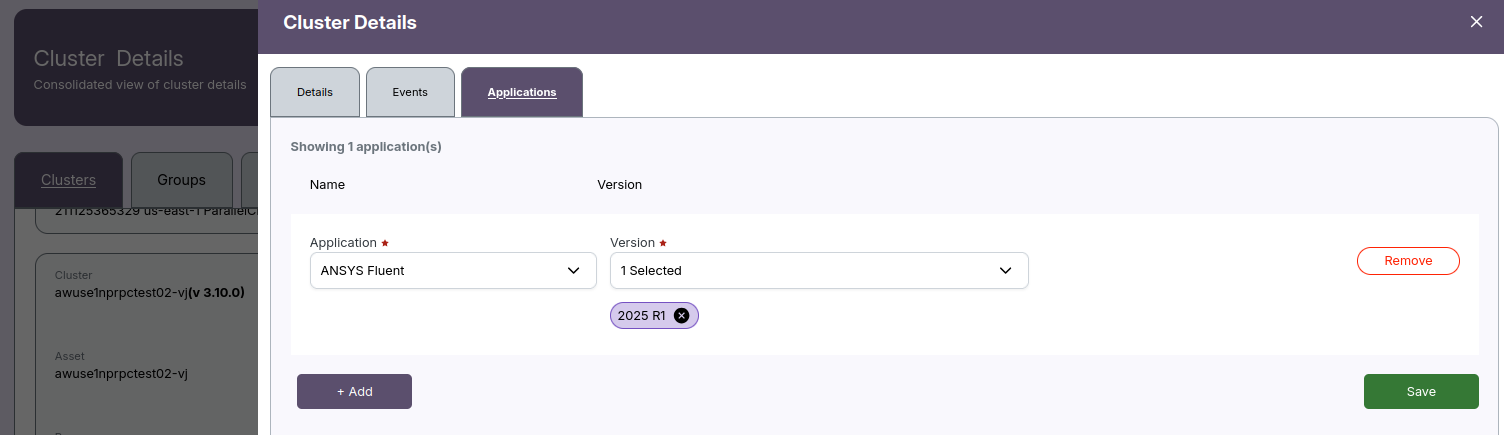
| Application Dropdown | Select from a list of predefined software packages (e.g., ANSYS Fluent). |
| Version Tag(s) | Multi-select enabled — choose one or more versions relevant to that application (e.g., 2025 R1). |
| Remove | Deletes the entire application entry from the list. |
| + Add | Adds a new row for another application entry. |
| Save | Persists all selected applications and versions to the cluster configuration. |
Behavior
- Required fields are marked with a red asterisk
*. - You may associate multiple applications with a single cluster.
- Versions are multi-tag selectable, allowing clusters to support multiple releases of the same tool.
- Use the Remove button to discard a row.
- Use the + Add button to register another application (e.g., add
MATLAB,OpenFOAM).
📌 General Notes:
- The version list is populated dynamically based on the selected application.
Example
To assign ANSYS Fluent (2025 R1) to a cluster:
- Click
+ Add. - Select
ANSYS Fluentfrom the Application dropdown. - In the Version field, pick
2025 R1from the list. - Optionally repeat for more applications.
- Click Save.
This registers the selected software and versions to the cluster metadata, making them visible to administrators and users.
Best practices
- Always specify accurate versions — this impacts module loading, environment setup, and scheduler integration.
- Keep software definitions consistent across environments (test, staging, production clusters).
- Use naming conventions that match vendor releases (
2025 R1,2024.3, etc.). - Periodically audit applications for deprecation or upgrades.
Permissions
Cluster-level write access is required to modify the Applications list. Users with read-only access will be able to view applications but not edit them.
Troubleshooting
| Issue | Cause | Resolution |
|---|---|---|
| Dropdown is empty | No application definitions exist | Contact admin to configure supported applications |
| Can't save | Required fields missing | Ensure Application and Version are both selected |
| Version list not loading | Backend lookup issue | Refresh the page or check with support |
📌 General Notes:
- If you encounter any UI issues or have questions about job submissions or status, please contact the Admin for support.