Projects
The Projects module provides project-level access management for workloads in Tachyon.
Projects associate users with project-specific workloads and resources. Project membership determines which projects are available to users during supported operations such as Job Submission and Workstation Subscription.
Project Access by Role
Project access depends on the user's role.
| Role | Project Access |
|---|---|
| Administrator | Can view and manage projects across the platform. Administrators can manage members, view members, edit, and delete projects. |
| Manager | Can create projects and manage projects owned by the Manager. Managers can manage members, view members, edit, and delete their projects. |
| Engineer | Does not have access to the Projects module. Projects assigned to the Engineer become available in supported workload flows such as Job Submission and Workstation Subscription. |
View Projects
Navigate to:
HPC → Projects
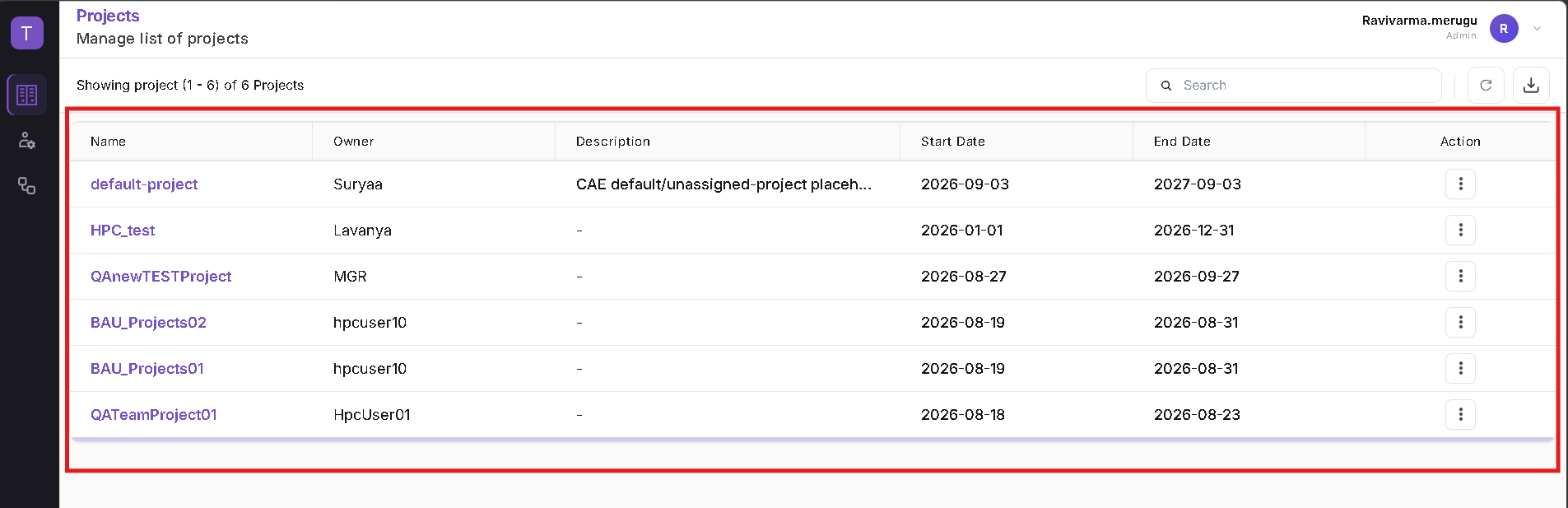
The Projects page displays the projects available to the logged-in user.
Project information includes:
- Name
- Owner
- Description
- Start Date
- End Date
- Action
Managers can create projects and manage the projects available to them.
Administrators can view and manage projects across the platform.
Project Management Workflows
The Projects module supports the following workflows:
- Create Project – Create a project and configure its project code, data path, dates, and business properties.
- Manage Project Members – Add or remove users from a project and review the current membership.
- Project Actions – View members, edit project details, or delete a project.
Refer to the corresponding pages in this section for detailed instructions.
Project Availability in Workload Flows
Project membership controls which projects are available to users during supported workload operations.
For example, when an Engineer is added to a project, that project becomes available in supported flows such as:
- Job Submission
- Workstation Subscription
If the Engineer is removed from the project and the membership changes are saved, the project is no longer available to that Engineer.
- Project creation is performed by Manager users.
- Administrators can manage projects across the platform.
- Managers manage projects available to them.
- Engineer users do not have a standalone Projects module.
- Project membership controls project availability in supported workload flows.
- Project is mandatory during Job Submission.
- Project can be selected during Workstation Subscription.
- Project Code is displayed together with the project name where applicable.